
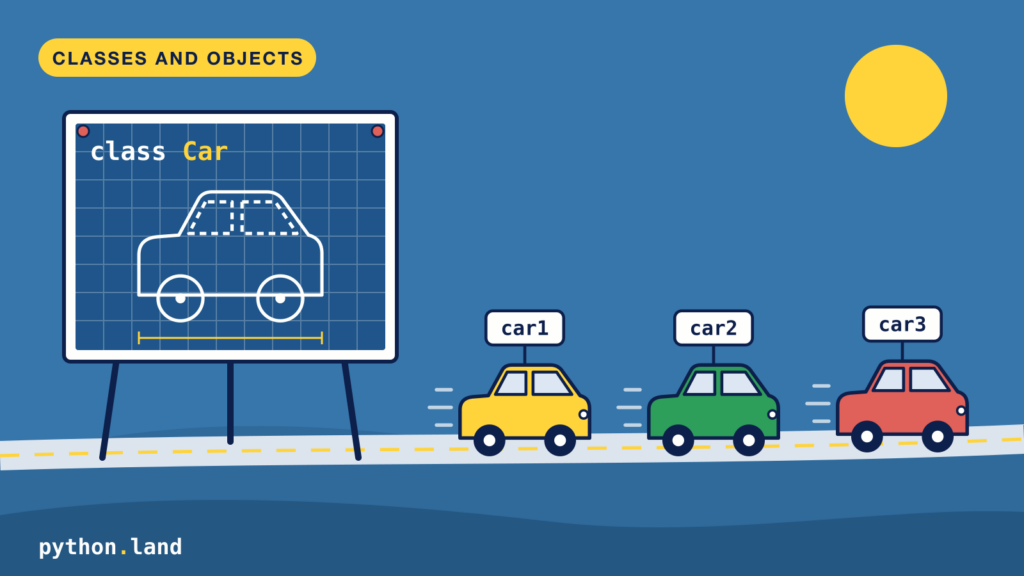
The Python class and Python objects are a crucial part of the language. You can’t properly learn Python without understanding Python classes and objects. In this chapter, you will learn:
- How in Python everything is an object
- To define your own Python class
- Create objects based on a class
- The difference between class and instance attributes
- How to make your objects print nicely
- What inheritance is
- When to use data classes and slots
When you’re just creating small scripts, chances are you don’t need to create your own Python classes. But once you start creating larger applications, objects and classes allow you to organize your code naturally. A good understanding of objects and classes will help you understand the language itself much better.
Python objects: a look under the hood
Before we dive into all the details, let’s start by taking a look under the hood. I do this because I believe it will give you a much better understanding of these concepts. Don’t let the length of this page discourage you. After reading it thoroughly, and trying the examples yourself, you should have a good understanding of classes and objects in Python.
OK; let’s dive in! You probably know the built-in len() function. It simply returns the length of the object you give it. But what is the length of, say, the number five? Let’s ask Python:
>>> len(5)
Traceback (most recent call last):
  File "<stdin>", line 1, in <module>
TypeError: object of type 'int' has no len()Code language: Python (python)
I love errors because they illustrate how Python works internally. In this case, Python is telling us that 5 is an object, and it has no len(). In Python, everything is an object. Strings, booleans, numbers, and even Python functions are objects. We can inspect an object in the REPL using the built-in function dir(). When we try dir on the number five, it reveals a big list of functions that are part of any object of type number:
>>> dir(5)
['__abs__', '__add__',
'__and__', '__bool__',
'__ceil__', '__class__',
...
'__str__', '__sub__',
 '__subclasshook__', '__truediv__',
 '__trunc__', '__xor__',
'as_integer_ratio', 'bit_count',
'bit_length', 'conjugate',
'denominator', 'from_bytes',
 'imag', 'is_integer', 'numerator',
'real', 'to_bytes']Code language: Python (python)
I truncated the list a little for the sake of clarity.
The list starts with these weirdly named functions containing underscores, like __add__. These are called magic methods, or dunder (short for double underscore) methods. If you look closely, you’ll see that there’s no __len__ dunder method for objects of type int. That’s how Python’s len() function knows that a number does not have a length. All len() does, is call the __len__() method on the object you offered it. That’s also why Python complained that “objects of type ‘int’ have no len().”
What are Python Methods?
I casually introduced the word methods here. Let me define it more formally:
- Method
- When a function is part of an object or Python class, we call it a method.
Strings do have a length, so a string must have a len method, right? Let’s find out!
>>> dir("test")
['__add__', '__class__',
'__contains__', '__delattr__',
'__dir__', '__doc__',
'__eq__', '__format__',
'__ge__', '__getattribute__',
'__getitem__', '__getnewargs__',
'__getstate__', '__gt__', '__hash__', '__init__',
'__init_subclass__', '__iter__',
'__le__', '__len__', '__lt__',
'__mod__', '__mul__', '__ne__',
'__new__', '__reduce__',
'__reduce_ex__', '__repr__',
'__rmod__', '__rmul__',
'__setattr__', '__sizeof__',
'__str__', '__subclasshook__',
'capitalize', 'casefold', 'center',
'count', 'encode', 'endswith',
'expandtabs', 'find', 'format',
'format_map', 'index', 'isalnum',
'isalpha', 'isascii', 'isdecimal',
'isdigit', 'isidentifier', 'islower',
'isnumeric', 'isprintable', 'isspace',
'istitle', 'isupper', 'join', 'ljust',
'lower', 'lstrip', 'maketrans',
'partition', 'removeprefix',
'removesuffix', 'replace', 'rfind',
'rindex', 'rjust', 'rpartition',
'rsplit', 'rstrip', 'split',
'splitlines', 'startswith', 'strip',
'swapcase', 'title', 'translate',
'upper', 'zfill']Code language: Python (python)
Yup, there it is. And since this is a method, we can call it too:
>>> "test".__len__()
4Code language: Python (python)
This is equivalent to len("test") but a lot less elegant, so don’t do this. It’s just to illustrate how this stuff works.
There’s also a list of other, less magical methods that dir() revealed to us. Feel free to try a few, like islower:
>>> "test".islower()
TrueCode language: Python (python)
This method checks if the entire string is lower-case, which it is, so Python returns the boolean True. Some of these methods require one or more arguments, like replace:
>>> 'abcd'.replace('a', 'b')
'bbcd'Code language: Python (python)
It replaces all occurrences of ‘a’ with ‘b’.
Sometimes programming might feel a bit like doing magic, especially when you’re just starting out. But once you take a peek under the hood and see how things actually work, a lot of that magic is gone. Let’s continue and find out what objects really are, and how they are defined.
What is a Python object?
Now that we’ve used objects and know that everything in Python is an object, it’s time to define what an object is:
- Object
- An object is a collection of data (variables) and methods that operate on that data. Objects are defined by a Python class.
Objects and object-oriented programming are concepts that became popular in the early 1990s. Early computer languages, like C, did not have the concept of an object. However, it turned out that objects are an easy-to-understand paradigm for humans. Objects can be used to model many real-life concepts and situations. Most, if not all, new languages have the concept of objects these days. So what you’re about to learn will conceptually apply to other languages too: this is fundamental computer science.
What is a Python class?
Since objects are the building blocks of the Python language, it’s only logical that you can create objects yourself too. If you want to create your own type of object, you first need to define its methods and what data it can hold. This blueprint is called a class.
- Class
- A class is the blueprint for one or more objects
All Python objects are based on a class. When we create an object, we call this ‘creating an instance of a class’. Strings, numbers, and even booleans are instances of a class too. Let’s explore with the built-in function type:
>>> type('a')
<class 'str'>
>>> type(1)
<class 'int'>
>>> type(True)
<class 'bool'>Code language: Python (python)
Apparently, there are classes called str, int, and bool. These are some of Python’s native classes, but, as I said, we can build our own types of classes too!
Creating a Python class
No tutorial is complete without a car analogy, so let’s make a Python class that represents a car. It’s a lot to type in, and you have to start over on each mistake. Feel free to try, but I understand if you want to take a shortcut. Just copy and paste the following class into your Python REPL. Make sure to hit enter twice after pasting it:
class Car:
    def __init__(self):
        self.speed = 0
        self.started = False

    def start(self):
        self.started = True
        print("Car started, let's ride!")

    def increase_speed(self, delta):
        if self.started:
            self.speed = self.speed + delta
            print('Vrooooom!')
        else:
            print("You need to start the car first")

    def stop(self):
        self.speed = 0
        print('Halting')Code language: Python (python)
Create a Python object
Don’t worry, we’ll go over the class definition step by step, but let’s first create and use a Python object of type Car:
>>> car = Car()
>>> car.increase_speed(10)
You need to start the car first
>>> car.start()
Car started, let's ride!
>>> car.increase_speed(40)
Vrooooom!Code language: Python (python)
An object in Python is always an instance of a class. One class can have many instances. We just created an instance of class Car, with Car(), and assigned it to the (lowercase) variable car. Creating an instance looks like calling a function; you’ll learn why later on.
Next, we call one of our car object methods: trying to increase its speed while it’s not started yet. Oops! Only after starting the car, we can increase its speed and enjoy the noise it makes.
Now let’s go over our Car class step by step:
- A class in Python is defined using the class statement, followed by the class’s name (Car). We start an indented block of code with the colon.
- The first method is special:
__init__. Python calls it automatically every time you create a new object withCar(). We use it to give each new car its own two variables,speedandstarted. This is data that every instance of this class will have. - Next, we defined three methods that operate on the variables.
The __init__ method is often called the constructor. It can take arguments too, like a car’s color or brand, so you can create each object with its own starting values. You can read all about it in the article on Python constructors.
In the definitions of these methods, we encounter something peculiar: they all have an argument called self as their first argument.
What Is self in Python?
Honestly, this is one of Python’s less elegant language constructs if you ask me.
Remember when we were calling the methods on our car object, like car.start()? We didn’t have to pass the self variable, even though start() is defined as start(self) inside the class.
This is what’s happening:
- When we call a method on a Python object, Python automatically fills in the first variable, which we call self by convention.
- This first variable is a reference to the object itself, hence its name.
- We can use this variable to reference other instance variables and functions of this object, like
self.speedandself.start().
So only inside the Python class definition, we use self to reference variables that are part of the instance. To modify the started variable that’s part of our object, we use self.started and not just started. By using self, it’s made abundantly clear that we are operating on a variable that’s part of this instance and not some other variable that is defined outside of the object and happens to have the same name.
Creating Multiple Python Objects
Since a Python class is just a blueprint, you can use it to create multiple objects, just like you can build multiple identical-looking cars. They all behave similarly, but they all have their own data that is not shared between objects:
>>> car1 = Car()
>>> car2 = Car()
>>> id(car1)
139771129539104
>>> id(car2)
139771129539160Code language: Python (python)
We created two car objects here, car1 and car2, and used the built-in method id() to get their ids. Each object in Python has a unique identifier, so we just proved that we created two different objects from the same class. We can use them independently:
>>> car1.start()
Car started, let's ride!
>>> car1.increase_speed(10)
Vrooooom!
>>> car1.speed
10
>>> car2.speed
0Code language: Python (python)
We just started car1 and increased its speed, while car2 is still halted. Inspection of the speeds confirms these are different cars with different states!
Class attributes vs instance attributes
Each car has its own speed because we set self.speed in __init__. Those are instance attributes: every object gets its own copy. You can also define a variable directly in the class body, outside any method. That’s a class attribute, and all instances share it:
class Car:
    wheels = 4  # class attribute, shared by all cars

    def __init__(self, color):
        self.color = color  # instance attribute, one per carCode language: Python (python)
>>> red = Car('red')
>>> blue = Car('blue')
>>> red.color, blue.color
('red', 'blue')
>>> red.wheels, blue.wheels
(4, 4)
>>> Car.wheels
4Code language: Python (python)Class attributes are fine for constants like this. But be careful with mutable values, like a list. Because there’s only one list, every instance changes the same one:
class Garage:
    cars = []  # one list, shared by every garage!

    def add(self, car):
        self.cars.append(car)Code language: Python (python)
>>> home = Garage()
>>> work = Garage()
>>> home.add('Volvo')
>>> work.cars
['Volvo']Code language: Python (python)We parked a Volvo at home, and it shows up at work too. The fix is to create the list in __init__ with self.cars = [], so each garage gets its own. As a rule of thumb: data that belongs to one object goes in __init__.
Printing objects with __repr__ and __str__
If you print one of our cars, you get something like <__main__.Car object at 0x106018e10>. That tells you the class and the memory address, but not much else. You can do better by adding two more dunder methods:
__repr__returns a string for developers. The REPL uses it when you inspect an object, and so do debuggers and logs. Ideally, it looks like the code you’d type to create the object.__str__returns a friendly string for users.print(),str()and f-strings use it. If you don’t define it, Python falls back to__repr__.
class Car:
    def __init__(self, color):
        self.color = color
        self.speed = 0

    def __repr__(self):
        return f"Car(color={self.color!r}, speed={self.speed})"

    def __str__(self):
        return f"A {self.color} car driving {self.speed} km/h"Code language: Python (python)
>>> car = Car('red')
>>> car
Car(color='red', speed=0)
>>> print(car)
A red car driving 0 km/h
>>> f"My car: {car}"
'My car: A red car driving 0 km/h'Code language: Python (python)If you write only one of the two, write __repr__.
Inheritance
A class can build on another class. The new class, called the subclass, inherits all the methods and attributes of the class it’s based on, and you only add what’s different. Here, a bicycle is a vehicle with a bell:
class Vehicle:
    def __init__(self):
        self.speed = 0

    def stop(self):
        self.speed = 0
        print('Halting')

class Bicycle(Vehicle):
    def ring_bell(self):
        print('Ring ring!')Code language: Python (python)
>>> bike = Bicycle()
>>> bike.ring_bell()
Ring ring!
>>> bike.speed
0
>>> bike.stop()
Halting
>>> isinstance(bike, Vehicle)
TrueCode language: Python (python)We never wrote an __init__ or a stop() method for Bicycle, yet it has both. They come from Vehicle. There’s more to it, like overriding methods and calling the parent with super(). You can learn all about that in the article on Python inheritance.
Data classes
Many classes exist mainly to hold data. For those, writing __init__ and __repr__ by hand gets old fast. The @dataclass decorator writes them for you, based on the fields you declare with type hints:
from dataclasses import dataclass

@dataclass
class Card:
    rank: str
    suit: strCode language: Python (python)
>>> Card('queen', 'hearts')
Card(rank='queen', suit='hearts')
>>> Card('queen', 'hearts') == Card('queen', 'hearts')
TrueCode language: Python (python)You get a constructor, a readable __repr__, and an == that compares the fields, all for free. Read more in the article on Python data classes.
Class slots: fixed attributes with __slots__
Normally, you can add any attribute to an object at any time. Python stores the attributes of each object in a dictionary, which you can see as obj.__dict__. With __slots__, you tell Python up front which attributes your objects can have. Python then stores them in fixed places instead of a dictionary. That has two effects:
- Each object takes up less memory.
- You can’t add attributes that aren’t in the list. Trying it raises an
AttributeError.
Here’s a slotted class for playing cards:
class Card:
    __slots__ = ('rank', 'suit')

    def __init__(self, rank, suit):
        self.rank = rank
        self.suit = suitCode language: Python (python)
To me, the nicest part is that a typo now gets caught. Without slots, Python would silently create a new attribute called suite. With slots, you get an error:
>>> qh = Card('queen', 'hearts')
>>> qh.rank
'queen'
>>> qh.suite = 'spades'
Traceback (most recent call last):
  File "<stdin>", line 1, in <module>
    qh.suite = 'spades'
    ^^^^^^^^
AttributeError: 'Card' object has no attribute 'suite' and no __dict__ for setting new attributes. Did you mean '.suit' instead of '.suite'?Code language: Python (python)
The memory savings only matter when you create lots of objects. I measured 100,000 cards with tracemalloc on Python 3.15: the regular class used 9.6 MB, the slotted one 5.6 MB.
So when should you bother? Use slots for small classes that you create many instances of, or when you want to lock down which attributes an object can have. For most everyday classes, you don’t need them. Keep in mind that a slotted class can’t get new attributes on the fly, and that each subclass needs its own __slots__ to keep the savings. If you use data classes, you can get slots by writing @dataclass(slots=True).
Keep learning
- You might be interested in Python data classes too
- How to return multiple values from a function
- The official documentation on classes