
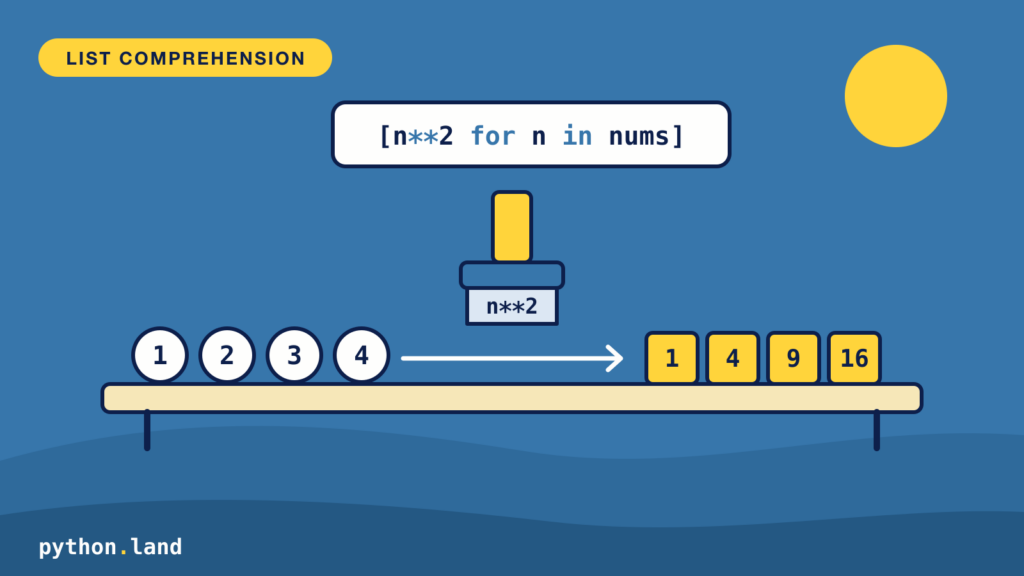
There’s a concept called set-builder notation in mathematics, also called set comprehension. Inspired by this principle, Python offers list comprehensions. In fact, Python list comprehensions are one of the defining features of the language. They let you write concise, readable code that replaces many for loops and calls to map() and filter().
We’ll first look at the most well-known type: list comprehensions. Once we’ve got a good grasp of how they work, you’ll also learn about set comprehensions and dictionary comprehensions.
What are list comprehensions?
A Python list comprehension is a language construct. It’s used to create a Python list based on an existing list. Sounds a little vague, but after a few examples, that ‘ah-ha!’ moment will follow, trust me.
The basic syntax of a list comprehension is:
[ <expression> for item in list if <conditional> ]Code language: Python (python)The ‘if’-part is optional, as you’ll discover soon. However, we do need a list to start from. Or, more specifically, anything that can be iterated. We’ll use Python’s range() function, which produces numbers one at a time without building a list in memory first.
Examples of list comprehensions
Enough theory, let’s look at the most basic example, and I encourage you to fire up a Python REPL to try this yourself:
>>> [x for x in range(1, 5)]
[1, 2, 3, 4]Code language: Python (python)
Some observations:
- The
expressionpart is justx - Instead of a list, we use the range() function. We can use
[1, 2, 3, 4]too, but using range() is more efficient and requires less typing for longer ranges.
The result is a list of elements, obtained from range(). Not very useful, but we did create our first Python list comprehension. We could just as well use:
>>> list(range(1,5))
[1, 2, 3, 4]Code language: Python (python)
So let’s throw in that if-statement to make it more useful:
>>> [x for x in range(1,10) if x % 2 == 0]
[2, 4, 6, 8]Code language: Python (python)
The if-part acts like a filter. If the condition after the if resolves to True, the item is included. If it resolves to False, it’s omitted. This way, we can get only the even numbers using a list comprehension.
List comprehension with if and else
What if you don’t want to drop items, but replace them? Then you need if and else, and they go in a different place: at the front, as part of the expression. This uses Python’s conditional expression, a if condition else b:
>>> nums = [3, -1, 0, 7, -5]
>>> [x if x > 0 else 0 for x in nums]
[3, 0, 0, 7, 0]
>>> [x for x in nums if x > 0]
[3, 7]Code language: Python (python)
Compare the two results. The first keeps all five items and replaces the negative numbers and the zero with 0. The second, with the if at the end, filters them out. So remember: an if at the end filters, and an if ... else at the front chooses a value. You can’t put an else after the filter at the end; that’s a syntax error.
The values don’t have to be numbers:
>>> ["even" if x % 2 == 0 else "odd" for x in range(5)]
['even', 'odd', 'even', 'odd', 'even']Code language: Python (python)
So far, our expression (the x) has been really simple. Just to make this absolutely clear though, expression can be anything that is valid Python code and is considered an expression. Example:
>>> [x + 4 for x in [10, 20]]
[14, 24]Code language: Python (python)
This expression adds four to x, which is still quite simple. But we could also have done something more complicated, like calling a function with x as the argument:
def some_function(a):
    return (a + 5) / 2

m = [some_function(x) for x in range(8)]
print(m)
# [2.5, 3.0, 3.5, 4.0, 4.5, 5.0, 5.5, 6.0]Code language: Python (python)
More advanced examples
You mastered the basics; congrats! Let’s continue with some more advanced examples.
Nested list comprehension
If expression can be any valid Python expression, it can also be another list comprehension. This can be useful when you want to create a matrix:
>>> m = [[j for j in range(3)] for i in range(4)]
>>> m
[[0, 1, 2], [0, 1, 2], [0, 1, 2], [0, 1, 2]]Code language: Python (python)
Or, if you want to flatten the previous matrix:
>>> [value for sublist in m for value in sublist]
[0, 1, 2, 0, 1, 2, 0, 1, 2, 0, 1, 2]Code language: Python (python)
The same, but with some more whitespace to make this clearer:
>>> [value
...  for sublist in m
...  for value in sublist]
[0, 1, 2, 0, 1, 2, 0, 1, 2, 0, 1, 2]Code language: Python (python)
The first part loops over the matrix m. The second part loops over the elements in each vector.
Reusing a value with the walrus operator
Sometimes you want to filter on the result of a calculation and also keep that result. Without help, you’d have to call the function twice. The walrus operator := (available since Python 3.8) assigns a value inside an expression, so you can compute it once in the filter and reuse it in the output:
def slow(x):
    return x * 10

print([y for x in range(5) if (y := slow(x)) > 15])
# [20, 30, 40]Code language: Python (python)
Use this sparingly. If a comprehension needs a walrus to stay efficient, a regular for loop is often easier to read.
Alternatives to list comprehensions
The Python language could do without comprehensions; it would just not look as beautiful. The functions map() and filter() can do the same work: map() applies a function to each item, and filter() keeps the items for which a function returns True. Our earlier examples would look like this:
>>> list(map(lambda x: x + 4, [10, 20]))
[14, 24]
>>> list(filter(lambda x: x % 2 == 0, range(1, 10)))
[2, 4, 6, 8]Code language: Python (python)
Most Python developers find the comprehension easier to read, especially once you need a lambda.
Another alternative is using for-loops. If you’re coming from a C-style language, like Java, you’ll be tempted to use for loops. Although it’s not the end of the world, list comprehensions are considered better style for building a list. They’re usually a bit faster than a loop that calls append(), too, but the difference is small. Choose based on readability: if the comprehension gets long or needs several conditions, a regular for loop is the better choice.
Other comprehensions
If there are list comprehensions, why not create dictionary comprehension as well? Or what about set comprehensions? As you might expect, both exist.
Set comprehensions
The syntax for a Python set comprehension is not much different. We just use curly braces instead of square brackets:
{ <expression> for item in set if <conditional> }Code language: Python (python)For example:
>>> {s for s in range(1,5) if s % 2}
{1, 3}Code language: Python (python)
Dictionary comprehensions
A dictionary requires a key and a value. Otherwise, it’s the same trick again:
>>> {x: x**2 for x in (2, 4, 6)}
{2: 4, 4: 16, 6: 36}Code language: Python (python)
The only difference is that we define both the key and value in the expression part.
Generator expressions
If you use round brackets instead of square brackets, you don’t get a tuple comprehension. You get a generator expression. It produces its values one at a time, when they’re asked for, instead of building the whole list in memory:
>>> squares = (x * x for x in range(1, 5))
>>> squares
<generator object <genexpr> at 0x105798740>
>>> list(squares)
[1, 4, 9, 16]Code language: Python (python)
This is ideal when you feed the values straight into a function like sum(), max(), any() or all(). When the generator expression is the only argument, you can even leave out the extra brackets:
>>> sum(x * x for x in range(1, 5))
30
>>> any(x < 0 for x in [3, -1, 0, 7, -5])
TrueCode language: Python (python)
A generator can only be used once. After list(squares) above, squares is used up and won’t produce any more values. You can read more about how this works in the article on Python iterators.