
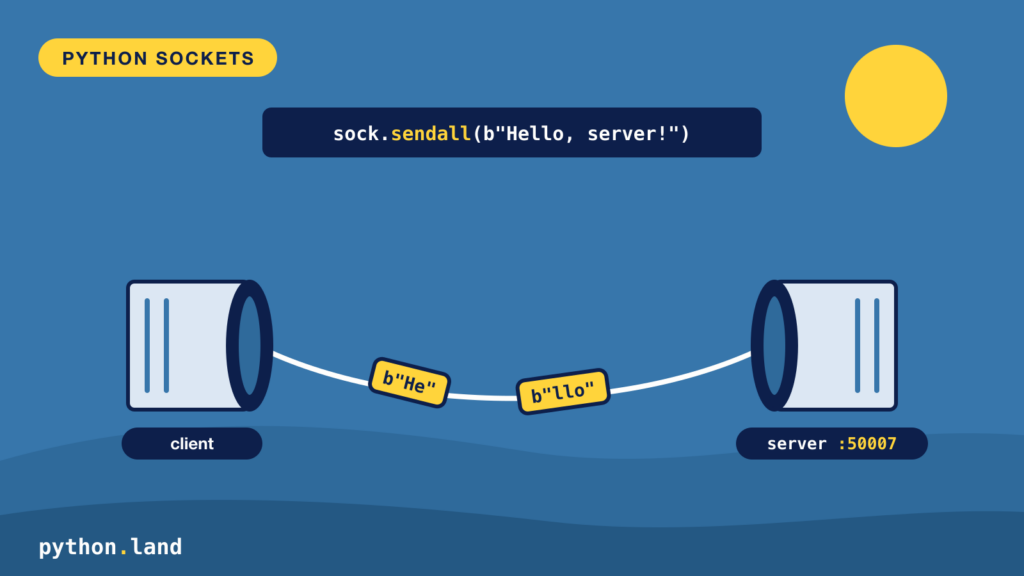
Python socket programming means letting two programs talk over a network through the built-in socket module, so you can write your own client and server in a few lines, with nothing to install. Every program that talks over a network, from your browser to a chat app, sits on top of sockets. A socket is one end of a connection between two programs.
In this tutorial, you will build a small TCP server and a client that talks to it. Along the way, you will learn the three things that trip up almost everyone who writes socket code for the first time: everything is bytes, a message can arrive in pieces, and a wait without a limit can hang forever.
What is a Python socket?
A socket is an endpoint that a program uses to send and receive data over a network. Two programs that want to talk each open a socket, and the operating system carries the bytes between them. One program, the server, waits for connections on a known address. The other, the client, connects to that address.
An address has two parts:
- The host: which computer to talk to, as an IP address like
127.0.0.1or a name likepython.land. - The port: which program on that computer, as a number between 1 and 65535. Web servers usually listen on port 80 or 443. For your own experiments, pick something above 1024, like 50007.
The address 127.0.0.1 is special. It is the loopback address, and it always means “this computer”. It’s perfect for learning: your client and server talk to each other without anything leaving your machine.
TCP or UDP?
Sockets come in two main flavours. TCP (SOCK_STREAM) gives you a reliable, ordered stream of bytes: what you send arrives, in order, or you get an error. UDP (SOCK_DGRAM) sends separate packets that may arrive out of order or not at all. Almost everything you use daily, including HTTP and WebSockets, runs on TCP, so that’s what we’ll use here.
A minimal Python socket server
Let’s start with an echo server: it accepts one connection and sends back everything it receives. Save this as echo_server.py:
import socket

HOST = "127.0.0.1"  # only accept connections from this computer
PORT = 50007

with socket.socket(socket.AF_INET, socket.SOCK_STREAM) as server:
    server.setsockopt(socket.SOL_SOCKET, socket.SO_REUSEADDR, 1)
    server.bind((HOST, PORT))
    server.listen()
    print(f"Listening on {HOST}:{PORT}")
    conn, address = server.accept()
    with conn:
        print("Connected by", address)
        while True:
            data = conn.recv(1024)
            if not data:  # the client closed the connection
                break
            conn.sendall(data)Code language: Python (python)
Here’s what each step does:
socket.socket(AF_INET, SOCK_STREAM)creates a TCP socket for IPv4 addresses.setsockopt(... SO_REUSEADDR ...)lets you restart the server right away, instead of waiting for the operating system to release the port.bind((HOST, PORT))claims the address. Note the double parentheses: the address is one tuple.listen()tells the operating system to start queueing incoming connections.accept()waits until a client connects. It returns a new socket,conn, for talking to that one client, plus the client’s address.recv(1024)waits for up to 1024 bytes. An empty result means the other side closed the connection, so we stop.
Using with makes sure both sockets are closed, even if something goes wrong.
A Python socket client
Now the other side. Save this as echo_client.py:
import socket

HOST = "127.0.0.1"
PORT = 50007

with socket.create_connection((HOST, PORT), timeout=5) as sock:
    sock.sendall("Hello, server!".encode("utf-8"))
    reply = sock.recv(1024)

print("Received:", reply.decode("utf-8"))Code language: Python (python)
Start the server in one terminal, then run the client in a second terminal:
$ python echo_client.py
Received: Hello, server!Code language: plaintext (plaintext)
socket.create_connection() is the convenient way to open a client connection. It looks up the host, connects, and, because we passed timeout=5, makes every later wait on this socket give up after five seconds with a TimeoutError. Without a timeout, a client waiting for a server that never answers waits forever. Put a limit on every wait; it’s the single most useful habit in network code.
Want to try this without opening two terminals? Follow the free interactive lesson where you connect, send and receive over TCP, with a server already running for you.
Python sockets send bytes, not strings
Notice the .encode("utf-8") and .decode("utf-8") calls. A socket knows nothing about text. It carries bytes, and it’s up to both sides to agree on how text becomes bytes. UTF-8 is the usual choice.
This matters more than it seems. In UTF-8, a character like é or an emoji takes more than one byte. If you decode a chunk that was cut in the middle of such a character, you get a UnicodeDecodeError. Which brings us to the most important lesson about sockets.
A message can arrive in pieces
TCP gives you a stream of bytes, not a series of messages. If the client sends 10,000 bytes in one sendall() call, the server may receive them in one recv(), or in five, or in fifty. On your own computer with small messages, it usually arrives in one piece, which is exactly why the bug hides until your code runs over a real network.
So every protocol built on TCP needs a rule for where one message ends and the next begins. The two common rules are:
- A delimiter: every message ends with a newline, and the reader collects bytes until it sees one. Simple, and great for text.
- A length prefix: every message starts with a fixed-size header that says how many bytes follow. Needed when the message itself can contain any byte, including newlines.
Let’s use the first rule. Python’s makefile() wraps a socket in a file-like object, so you can read it line by line, and the buffering is handled for you. This client talks to the line server on port 50008 from the next section, so start that server first:
import socket

with socket.create_connection(("127.0.0.1", 50008), timeout=5) as sock:
    reader = sock.makefile("rb")
    for message in ["first", "second", "third"]:
        sock.sendall(f"{message}\n".encode("utf-8"))
        print(reader.readline().decode("utf-8"), end="")Code language: Python (python)
You said: first
You said: second
You said: thirdCode language: plaintext (plaintext)readline() keeps reading until it has a complete line, however many pieces it arrives in. In a real protocol, you also want a maximum line length, so a client that never sends a newline can’t make your server collect bytes forever.
A Python socket server for several clients
Our echo server handles one client and then exits. A real server loops around accept(). But if it serves each client inside that loop, one slow client blocks everyone else. The simplest fix is a thread per connection:
import socket
import threading

HOST = "127.0.0.1"
PORT = 50008


def handle(conn, address):
    with conn, conn.makefile("rb") as reader:
        for line in reader:  # one complete message per line
            text = line.decode("utf-8").rstrip("\n")
            conn.sendall(f"You said: {text}\n".encode("utf-8"))
    print("Closed", address)


with socket.create_server((HOST, PORT)) as server:
    print(f"Listening on {HOST}:{PORT}")
    while True:
        conn, address = server.accept()
        threading.Thread(target=handle, args=(conn, address), daemon=True).start()Code language: Python (python)
socket.create_server() does the create, bind and listen steps in one call. Each accepted connection gets its own thread, so a client that’s slow to send its next line only holds up its own thread. Run the line client from the previous section a few times, at the same time if you like, and each one gets its answers. Stop the server with Ctrl+C.
Threads work well for a modest number of clients. For thousands of connections, Python programs usually switch to asyncio, which handles many waits in a single thread.
When the connection fails
Network code fails in a few distinct ways, and it pays to tell them apart:
ConnectionRefusedError: the computer is there, but nothing listens on that port. Usually your server isn’t running, or you picked the wrong port.TimeoutError: nothing answered within your timeout. The host may be down, or a firewall may silently drop your packets.socket.gaierror: the host name could not be resolved to an address. Check for typos.ConnectionResetErroror an emptyrecv(): the other side closed the connection.
Here is what a refused connection looks like:
import socket

try:
    socket.create_connection(("127.0.0.1", 50999), timeout=2)
except ConnectionRefusedError as e:
    print("refused:", e)Code language: Python (python)
refused: [Errno 61] Connection refusedCode language: plaintext (plaintext)The exact error number differs per operating system. Catch the specific exception you can do something about, as explained in Python try except, instead of catching everything.
Where sockets fit
You rarely write raw sockets for everyday work. When you fetch a web page with Python requests, it opens a TCP socket, writes an HTTP request as lines of text, and reads the answer, using exactly the rules from this article: bytes, a clear end to every message, and a timeout on every wait. Knowing what happens underneath makes those libraries far less mysterious, and it makes network bugs much easier to find.
Keep learning
You now know how to open a TCP connection, write a server, and avoid the classic mistakes. If you’d like to practise this hands-on, our free Networks with Python course builds a small notice board service from these exact pieces: framing, timeouts, several clients at once, and tests that run without a network. The official socket module documentation is the full reference.