
Rich makes the text your Python programs print easier to read: colours, tables, progress bars and tracebacks that show what your variables held when it crashed. You get most of that by changing one import. This week’s package is rich 15.0, tested on Python 3.15.
What problem does rich solve?
Python’s print writes plain text, so a nested dictionary comes out as one long line and an error shows up as a wall of grey. Rich formats the same data for a human: it indents it, colours each type and draws tables and boxes, without you writing any formatting code.
Install rich
Install it with pip, inside a virtual environment:
pip install richCode language: Python (python)Or, in a project managed with uv:
uv add richCode language: Python (python)Rich is pure Python and has two small dependencies. It works on Python 3.9 and newer.
Example 1: a better print
Import print from rich and it replaces the built-in one. It pretty-prints data structures, and it understands markup in square brackets for colour and style:
from rich import print

order = {"id": 1042, "items": ["coffee", "croissant"], "paid": True, "total": 7.5}
print(order)
print("[bold green]Order paid[/bold green], total [yellow]€7.50[/yellow] :coffee:")Code language: Python (python)
This is what the terminal shows:
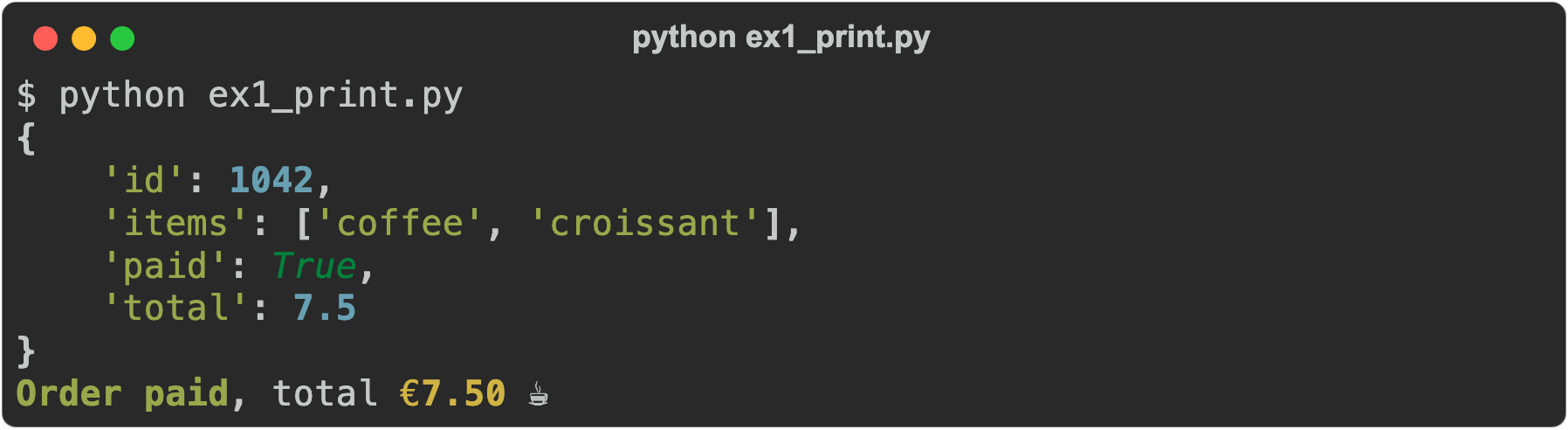
Strings are green, numbers blue and True is italic, and the dictionary is spread over several lines because it no longer fits on one. :coffee: became an emoji. If you only want this in the REPL, run from rich import pretty; pretty.install() and every result you type is pretty-printed.
Example 2: a table
A Table sizes its columns to the content and to the width of the terminal. You add columns, then rows, and the same markup works inside the cells:
from rich import print
from rich.table import Table

table = Table(title="Python releases")
table.add_column("Version", style="cyan")
table.add_column("Released")
table.add_column("Status")

table.add_row("3.15", "2026-10-09", "[green]bugfix[/green]")
table.add_row("3.14", "2025-10-07", "[green]bugfix[/green]")
table.add_row("3.10", "2021-10-04", "[red]end of life[/red]")

print(table)Code language: Python (python)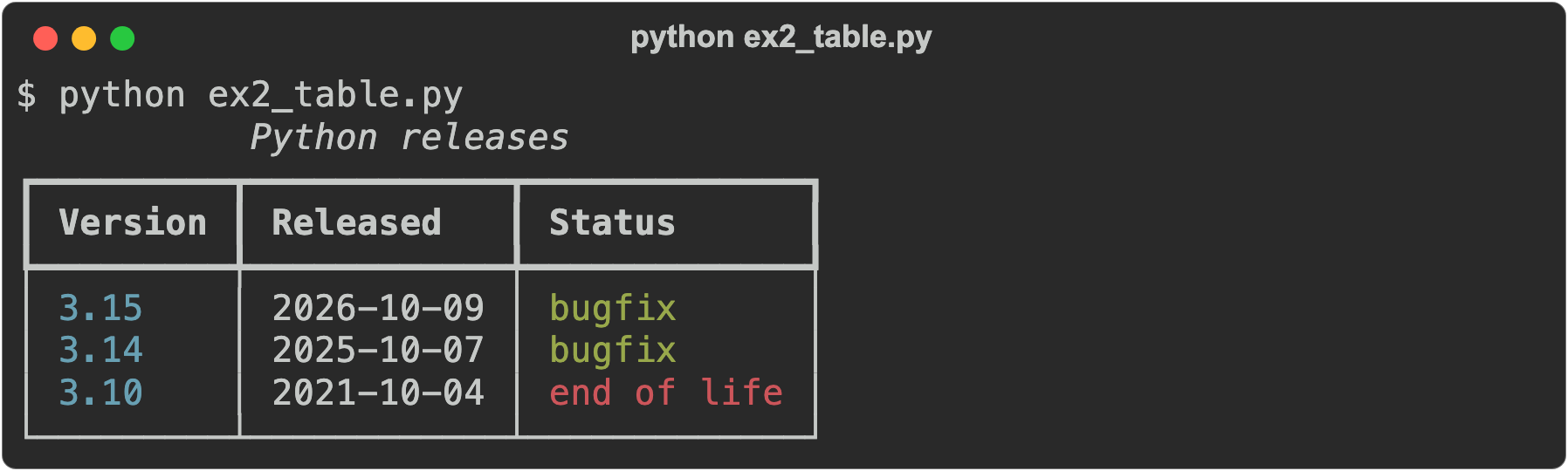
Make the terminal narrower and rich wraps the cells instead of breaking the lines of the table.
Example 3: tracebacks that show your variables
This is the one I would install rich for. Two lines at the top of a script replace Python’s traceback with one that shows the code around each line and, with show_locals=True, the value of every local variable in each frame:
from rich.traceback import install

install(show_locals=True)


def average(numbers):
    total = sum(numbers)
    return total / len(numbers)


scores = []
print(average(scores))Code language: Python (python)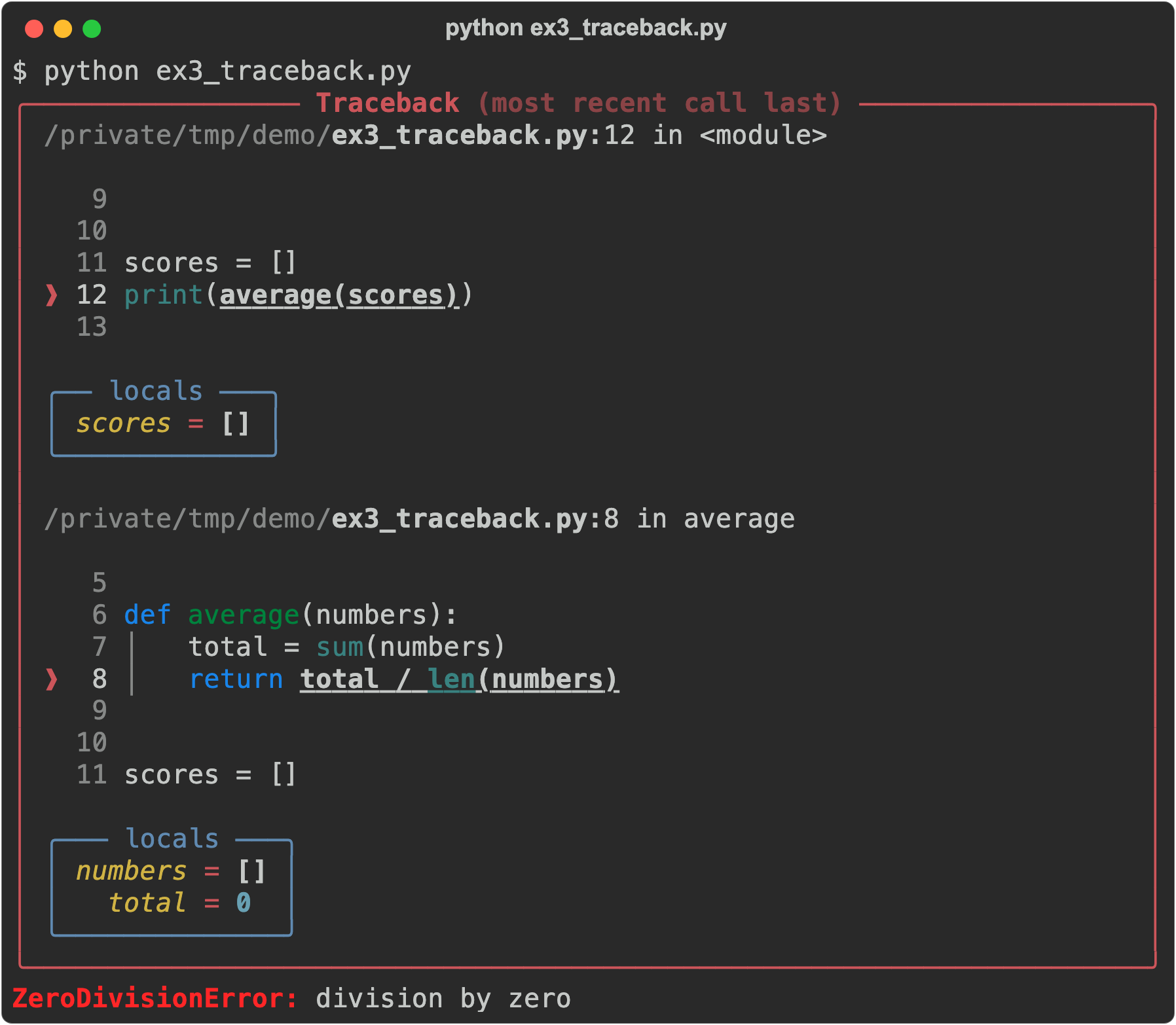
The locals box answers the first question you’d ask: numbers is an empty list, so len(numbers) is 0. A plain Python traceback gives you the line, but not the values. You still read it the same way, from the bottom up: the last line names the error, and the frame above it is where it happened.
And a progress bar
Wrap any loop in track to get a progress bar with a time estimate:
import time

from rich.progress import track

for step in track(range(20), description="Processing..."):
    time.sleep(0.05)Code language: Python (python)
Processing... ━━━━━━━━━━━━━━━━━━━━━━━━━━━━━━━━━━━━━━━━ 100% 0:00:01Code language: Python (python)When not to use rich
Don’t use it for output that another program reads. If your script’s output goes into a file, a pipe or another tool, plain print or the json module is what you want. Rich notices when it isn’t writing to a terminal and drops the colours, but a table still comes out with its box-drawing lines, which the next program then has to deal with. Also think twice about show_locals=True in a program that handles passwords or API keys: the traceback prints them.
Alternatives
pprintin the standard library pretty-prints data structures, without colour.- tqdm does progress bars only, and does them well.
- colorama gives you coloured text and nothing more.
- Textual, from the same author, builds full interactive terminal apps on top of rich.
My verdict
I add rich to almost all my projects by default. It gives me better logging output, through its RichHandler for Python’s logging module, and better debugging output: the tracebacks alone save me time every time something breaks.
Learn more
Rich was created by Will McGugan and has more than 57,000 stars on GitHub. Thanks to him and the other contributors. The documentation covers much more than this article: syntax highlighting, Markdown rendering, live displays and logging. The source is at github.com/Textualize/rich, under the MIT license.
Reading tracebacks well matters with or without rich. On python.land, see Python try except for handling errors and installing packages with pip. If you want to practise, the lesson Read a traceback from the bottom lets you do it in the browser.